Builder
Discover
Global Library41 Extensions
AI Nutrition Visualizer (VGL)
Made forEveryone
Dr. Louisa Ming Yan ChungVersion 1.0.13Oct 14, 2026
ExtensionShoppingHTML, CSS & JS
Interactive preview on a sample page. Chrome APIs are simulated, so real site data and API calls only work once installed.
Screenshots
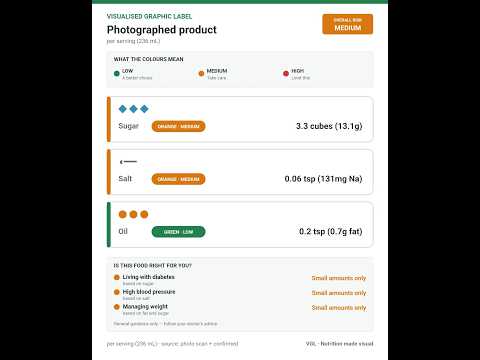
Overview
Visualised Graphic Label: sugar cubes, salt & oil teaspoons on supermarket product pages, plus on-device AI Dietitian in a Chrome side panel.
- See sugar cubes, salt and oil teaspoons beside products on supermarket pages
- Turn the label display on or off whenever you want
- Switch between a local database mode and a reading mode that scans labels
- Adjust how strict the label reading needs to be before a result is shown
- Set your own green and orange cutoffs for sugar, salt and oil
- Reset your cutoffs back to the WHO-based defaults in one click
How to use it
- Click the extension icon in your toolbar to open it.
- Opens in Chrome’s side panel, right next to the page you’re on.
- Works directly on the page on www.hktvmall.com, www.coles.com.au, www.woolworths.com.au and more.
Details
- Price
- Free
- Version
- 1.0.13
- Published
- Oct 14, 2026
- Built with
- HTML, CSS & JavaScript
- Size
- 34 files
- Publisher
- Dr. Louisa Ming Yan Chung
Works on
www.hktvmall.comwww.coles.com.auwww.woolworths.com.auwww.aldi.com.auwww.wellcome.com.hkwww.pns.com.hkwww.dh.gov.hkworld.openfoodfacts.org
Privacy
What this extension can access once installed.
These websites
www.hktvmall.com, www.coles.com.au, www.woolworths.com.au, www.aldi.com.au, www.wellcome.com.hk, www.pns.com.hk +2 more
Saves its own data in your browser
The page you are on, only when you click the extension
Opens in the browser side panel
Read from the extension's manifest — these are the permissions Chrome will ask you to grant.
Built with PlugThis
Want one like this, made your way?
Describe what you'd change and PlugThis builds your own version — no code needed.