How to Use PlugThis
From a one-line idea to a working Chrome extension installed in your browser — in under two minutes. Here's how every part of PlugThis works.
Getting Started
You have an idea for a Chrome extension. You don't have a developer, six weeks, or $5,000. PlugThis closes that gap — describe the extension in plain English and ship a working Manifest V3 build before your coffee gets cold.
Quick Start in 3 Steps
Sign in
Click "Build Your First Extension" on the homepage and sign in with Google. Free to try — no card needed.
Describe your extension
Tell the builder what you want in plain English. For example: "Save every article I read for more than 2 minutes to a Notion database." That's it.
Download & install
PlugThis returns a complete Manifest V3 bundle — manifest, scripts, popup, icons. Download the ZIP, unpack it, and load it as an unpacked extension at chrome://extensions.
💡 Stuck for an idea? Browse the extensions catalog for ready-to-build prompts, or paste a problem into the Idea Generator to get three tailored builds.
🔧 Free tools. Need a one-off manifest.json without running a full build? Use the Manifest V3 Generator. Want to understand what a permission does before requesting it? See the Permissions Explainer.
Chat with AI
The chat is where every build starts and where every change happens. Describe the extension in one paragraph and PlugThis returns the full Manifest V3 bundle — manifest, content scripts, popup, background service worker, icons. Want to iterate? Reply with what to change. No code edits required.
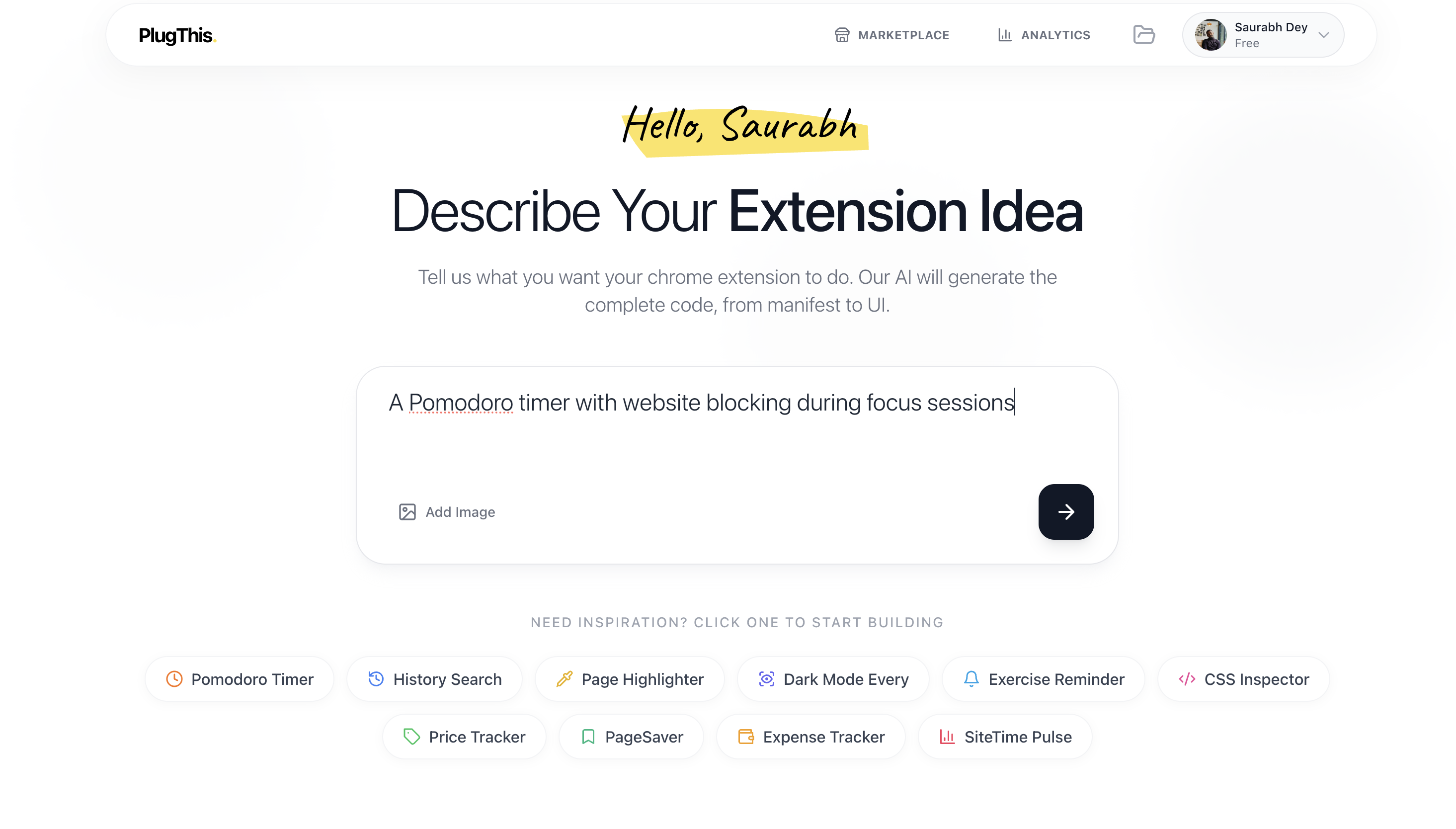
How to write good prompts
- ✓Be specific: "Add a Summarize button under every YouTube video that pulls the transcript and asks Claude for 5 bullets" beats "make a YouTube summarizer."
- ✓Name the trigger: What event starts the extension? A button click, a right-click menu, a keyboard shortcut, page load?
- ✓List the permissions: If you already know what you need (storage, activeTab, scripting), say so. Not sure? The Permissions Explainer covers what each one does.
- ✓Mention the host: If the extension only runs on certain sites (gmail.com, github.com, your CMS), list them. Scoped extensions are faster and pass review more easily.
Making Changes
After your extension is generated, you can ask the AI to make modifications:
- • "Change the button color to blue"
- • "Add a settings page"
- • "Make it work on YouTube only"
- • "Add a keyboard shortcut to activate it"
Image Uploads
You can upload images to help the AI understand what you want! This is great for:
- • Sharing mockups or designs
- • Showing examples of similar extensions
- • Pointing out specific UI elements you want to replicate
Code Editor
Even though you don't need to code, we provide a professional code editor if you want to make manual tweaks.
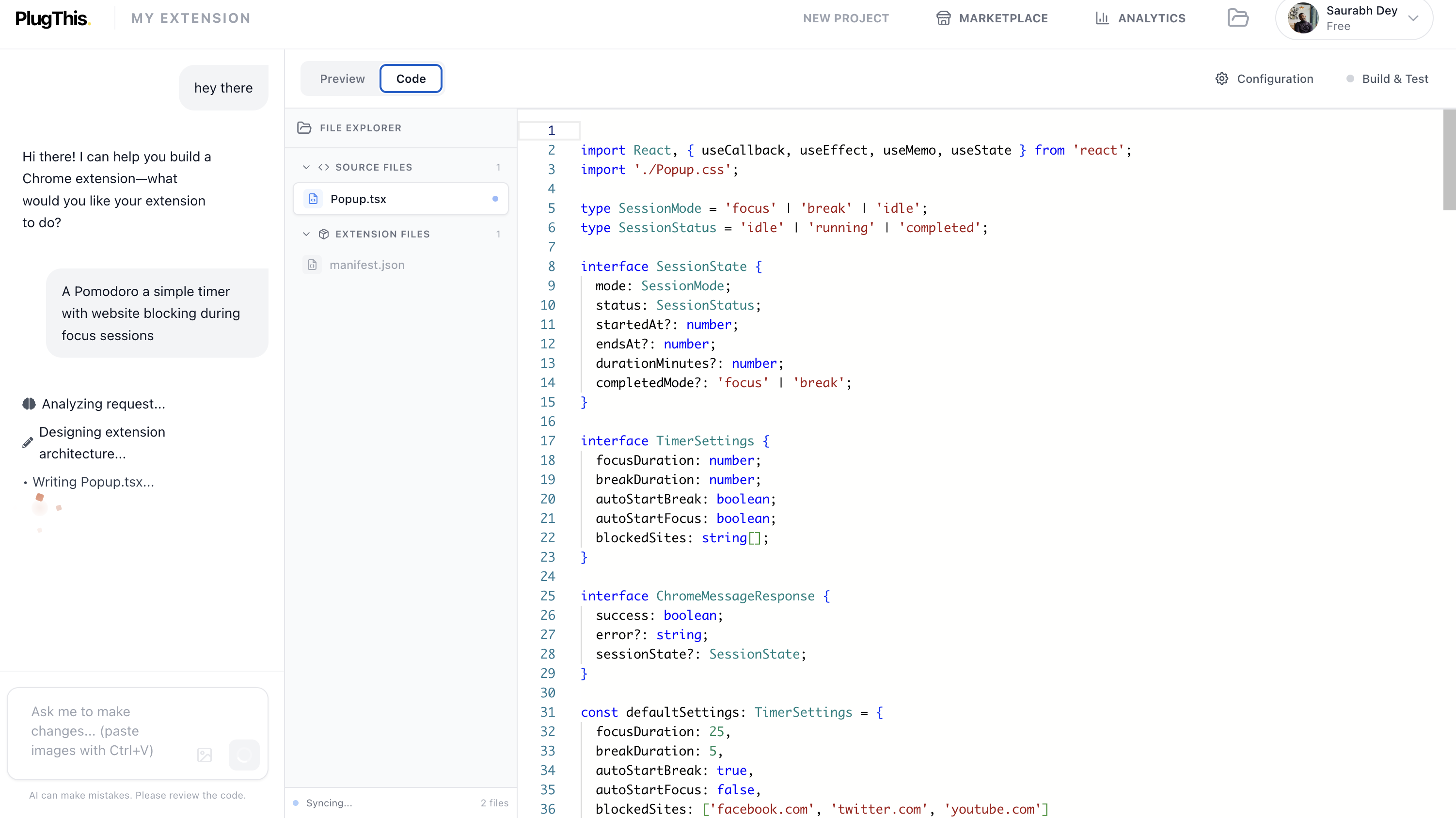
File Explorer
Browse all generated files including manifest.json, scripts, and styles
Syntax Highlighting
Code is color-coded for easy reading across JavaScript, TypeScript, HTML, and CSS
Real-time Updates
Changes you make are instantly reflected in the live preview
Multi-file Editing
Switch between files using tabs at the top of the editor
⚠️ Note: If you're not comfortable editing code, don't worry! Just ask the AI to make changes through chat instead.
Live Preview
Test your extension before installing it. The live preview runs your popup UI in a sandboxed browser frame so you can click, type, and verify behavior without loading anything into Chrome.
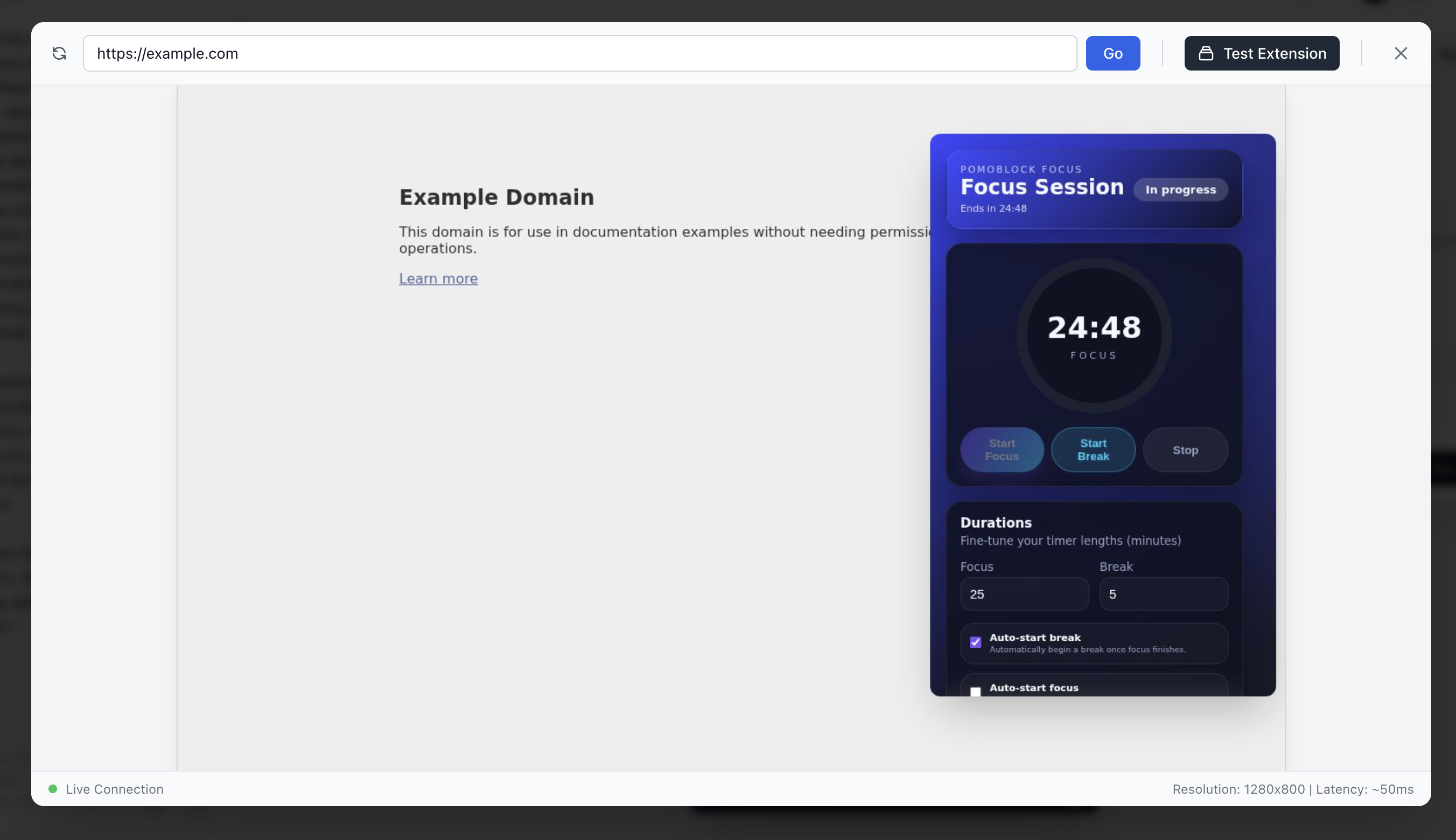
What the preview shows
- Sandboxed popup: Your extension's popup UI runs in an isolated Sandpack frame, fully interactive. Click buttons, type into inputs, navigate between views — all without installing anything.
- Live during generation: As PlugThis streams files into your extension, the preview updates in place — throttled to ~800ms so it stays smooth.
- Plan view first: Before generation starts, the preview shows the build plan so you can confirm what PlugThis is about to ship.
- Code-edit aware: Edits you make in the built-in code editor reflect in the preview immediately. No reload, no rebuild step.
✨ When you need to install instead. The preview runs your popup UI — it can't show content scripts running against real websites, network-rule blocking, or context-menu items. For those, download the build and load it at chrome://extensions with Developer mode on. Takes 30 seconds.
Export & Download
When you're happy with the build, export it as a ZIP. The output is a complete Manifest V3 folder — manifest, scripts, popup, icons, everything — ready to load into Chrome or submit to the Web Store.
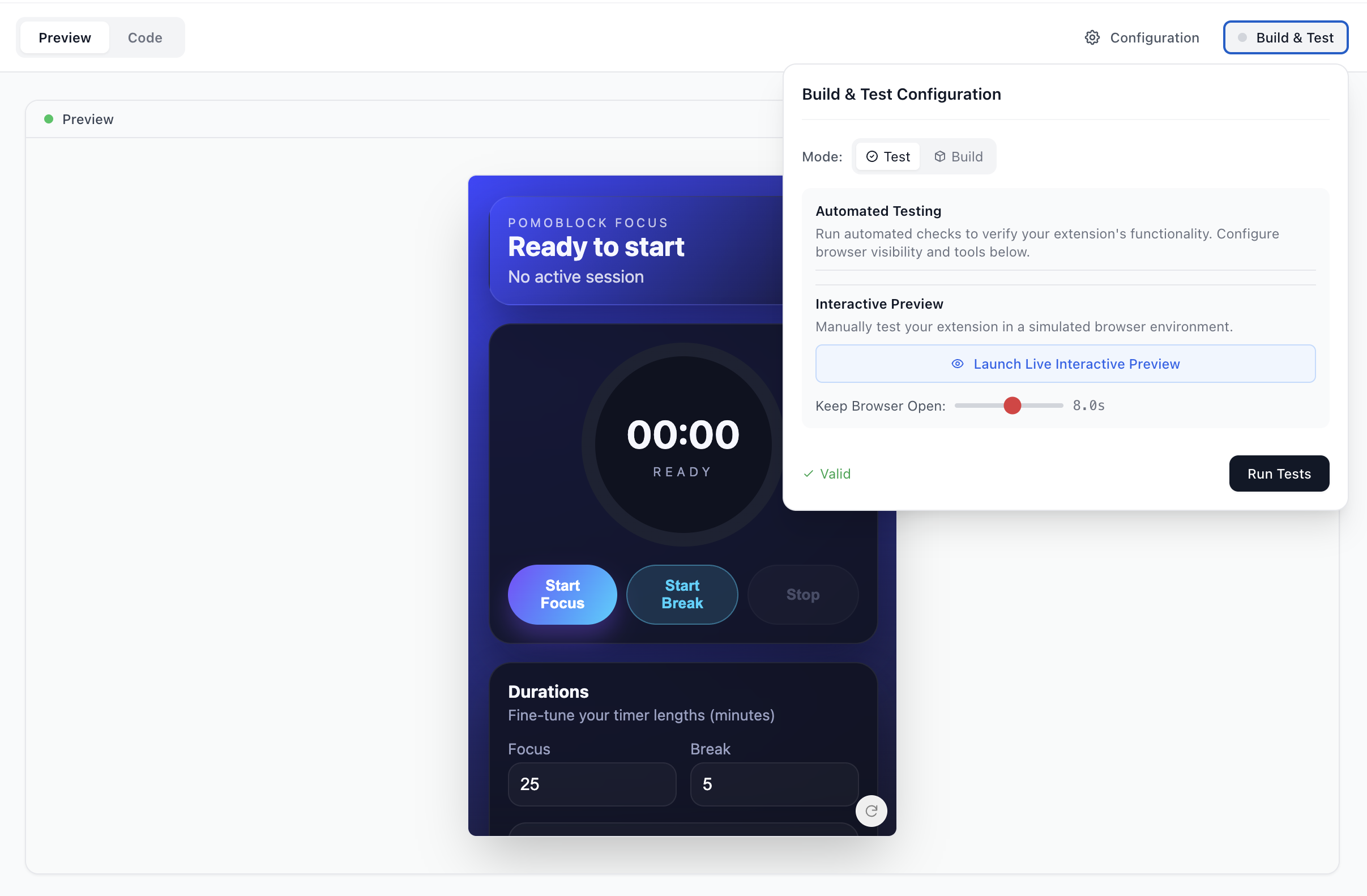
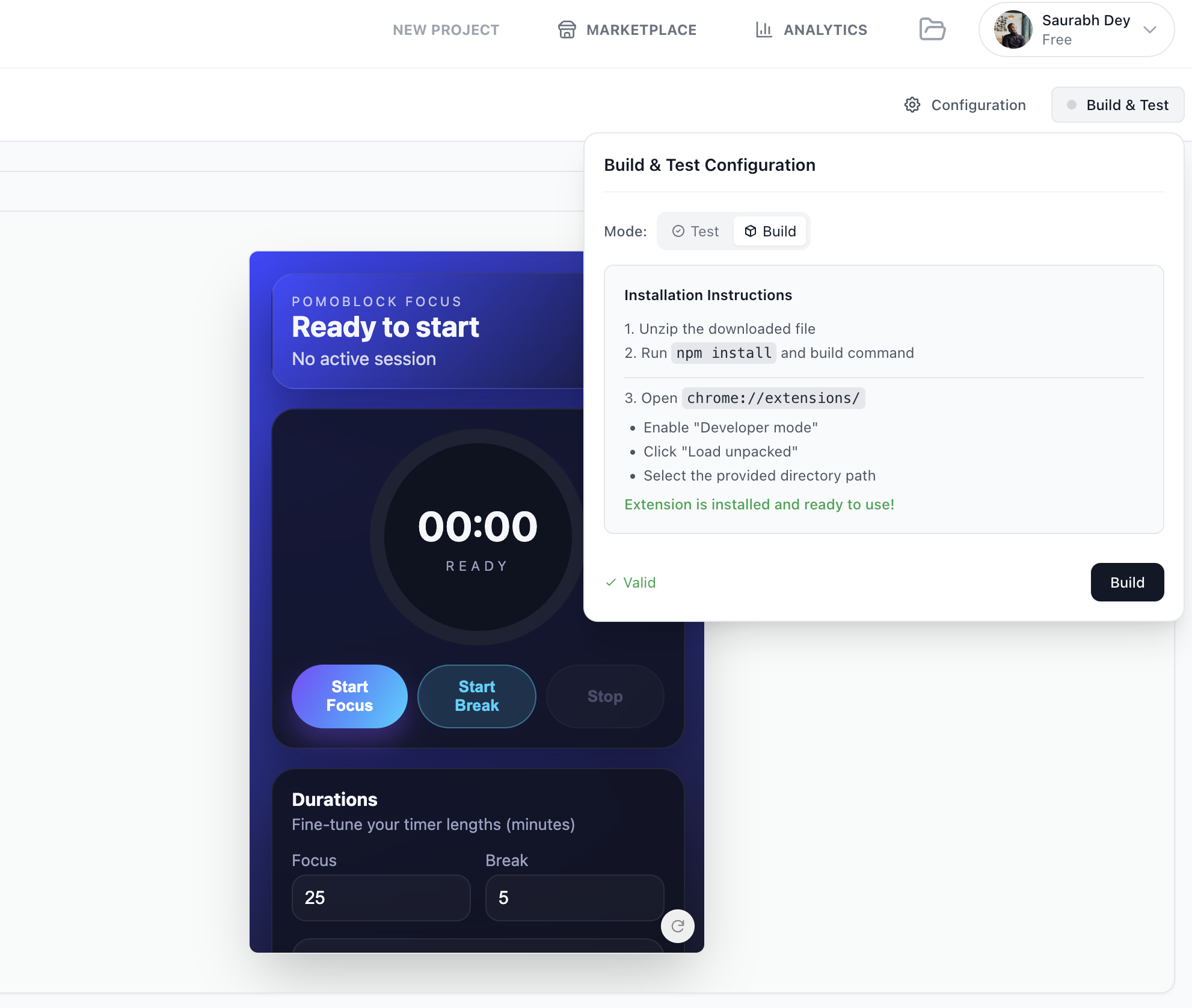
Ready to Export?
Once your extension is tested and valid, use the Build button to generate your final production-ready package.
How to Install Your Extension
Click the "Download" button to get your extension ZIP file
Unzip the file to a folder on your computer
Open Chrome and go to chrome://extensions
Enable "Developer mode" (toggle in the top-right)
Click "Load unpacked" and select your unzipped folder
Your extension is now installed! 🎉
Publishing to Chrome Web Store
Want to share your extension with the world? Your downloaded package is formatted and ready for the Chrome Web Store. You'll need a Google Developer account ($5 one-time fee) to publish.
My Extensions
Every extension you build is saved to your account. From here you can re-open any past build, iterate further, clone it as a starting point for a new extension, or download a fresh ZIP.
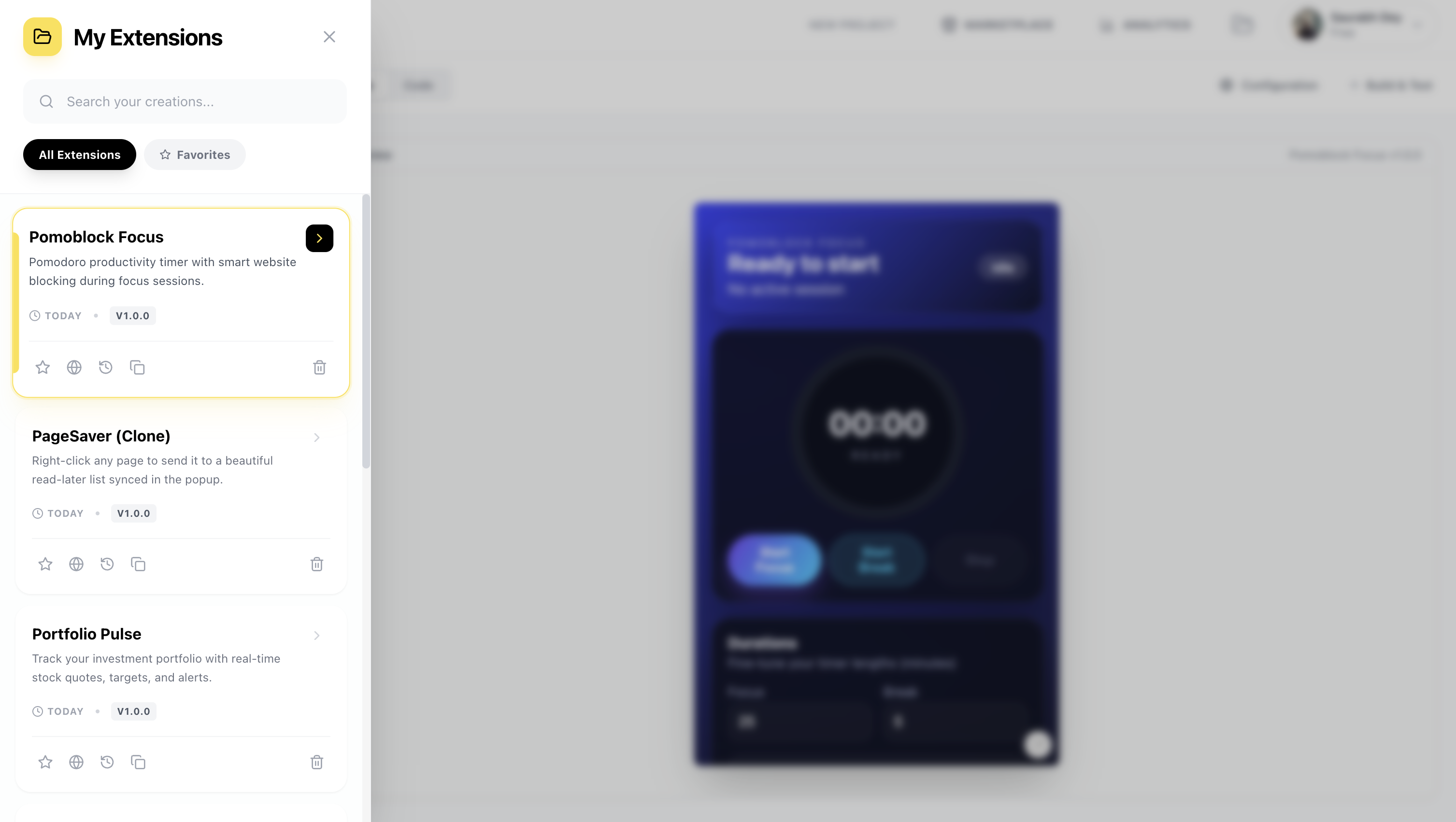
Publish
Make your extension public or download the package ready for the Chrome Web Store.
Clone
Instantly create a copy of any extension to test new features without breaking the original.
Version Control
Track changes and roll back to previous versions of your code whenever needed.
Billing & Plans
Simple, transparent monthly pricing. Cancel anytime. No per-seat fees, no surprise add-ons. Every plan includes ZIP export and full code ownership.
- ✓1 extension
- ✓Unlimited chats to build and refine it
- ✓Build & ship to the Chrome Web Store
- ✓Own all code — no lock-in
- ✓Cancel anytime
For builders shipping their first extension.
- ✓3 extensions
- ✓Unlimited chats to build and refine them
- ✓Full-stack (Supabase + LLM)
- ✓Priority support
- ✓Cancel anytime
For active builders shipping multiple extensions.
What does “Front-end only” vs “Full-stack” mean?
Front-end only (Starter): manifest, popup, content scripts, options page, icons. Everything that runs in the browser. Full-stack (Builder): everything in Front-end plus auto-wired Supabase backend (auth, database, edge functions) and LLM integration (OpenAI, Anthropic, Gemini) — useful when the extension needs persistent storage across users or AI features beyond the user's own API key.
Payment & billing
- • Payments are processed by Dodo Payments. We never store card details.
- • Plans are monthly — cancel anytime from your account settings, no exit fees.
- • Extensions you've already built stay on your machine and keep working forever, even after you cancel.
Managing your plan
Visit the Billing page to see your current plan, remaining monthly builds, and upgrade options. See the full plan comparison on the Pricing page.
Analytics & Performance
Monitor your build activity and extension performance with our professional analytics dashboard.
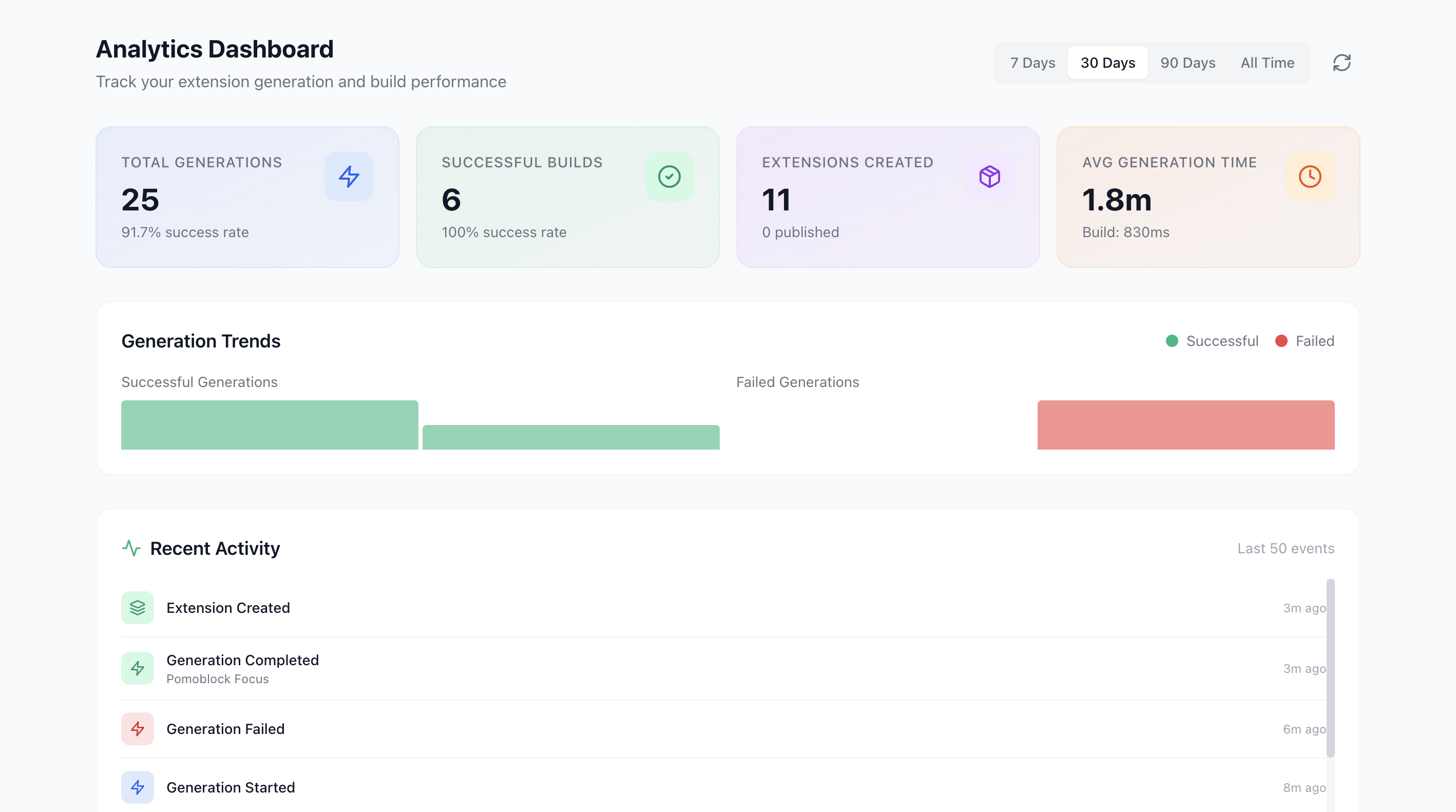
Generation Tracking
Monitor daily active generations to see how your building habits evolve.
Build Efficiency
Track Average Generation Time to measure how fast the AI is working for you.
Usage Summary
Get a holistic view of tokens used, active sessions, and total user impact.
Frequently Asked Questions
Do I need to know how to code?
No. Describe the extension in plain English and PlugThis returns a working Manifest V3 bundle. You only touch code if you want to.
Is the output a real extension or a prototype?
A real extension. The output is Manifest V3 compliant, uses native Chrome APIs, and ships as a folder you can load into Chrome immediately or publish to the Chrome Web Store.
Can I edit the generated code?
Yes. PlugThis ships with a built-in code editor with syntax highlighting and a live preview. Edits propagate to the preview in real time. Or just ask the AI to make the change in chat.
Who owns the code?
You do. Generated extensions are standalone — no licensing, no API keys phoning home, no PlugThis dependency at runtime. Download the folder and it's yours to keep, modify, ship, or sell.
How does this compare to building it myself or paying a developer?
A custom Chrome extension typically takes a developer 1–6 weeks and costs $2,000–$10,000+. PlugThis returns a working build in under two minutes. We rebuild popular paid extensions on video in our /rebuilds series so you can see the process end-to-end.
Will my extension use AI? Do I need to pay for an AI API?
Only if you want it to. AI is optional. If your extension needs AI features (summarizing, writing, translating), you bring your own API key (OpenAI, Anthropic, Gemini). The key lives in your extension's storage and never touches our servers.
Is my data private?
Your prompts and generated code are not used to train AI models. Extensions you build run entirely in your browser — no analytics, no telemetry, no third-party servers in the loop unless you wire one yourself.
Can I publish my extension to the Chrome Web Store?
Yes. The downloaded package is formatted for the Chrome Web Store. You'll need a Google Developer account ($5 one-time fee) to submit it.
What if I run out of monthly builds?
Builds reset at the start of each billing cycle. If you hit your cap before then, upgrade from Starter ($9.99/mo) to Builder ($29.99/mo) and you'll get more extensions and capacity. Cancel anytime from your account.
Can I get a refund?
Fees are generally non-refundable except as required by law. If you hit an issue, email support@plugthis.ai — we read and respond to every message.
Ready to build?
Skip the rest of the docs. Describe what you want and ship a Chrome extension in under two minutes.